Firmware by Stewardship: A Todoist Panel on Waveshare Hardware
This one is different from everything else I’ve published: it’s still in development, it’s my first time programming a hardware device, and the way it’s being built is itself the experiment — I’m leveraging LLM tools to investigate and write the code, based on my vision and stewardship of the project rather than line-by-line authorship.
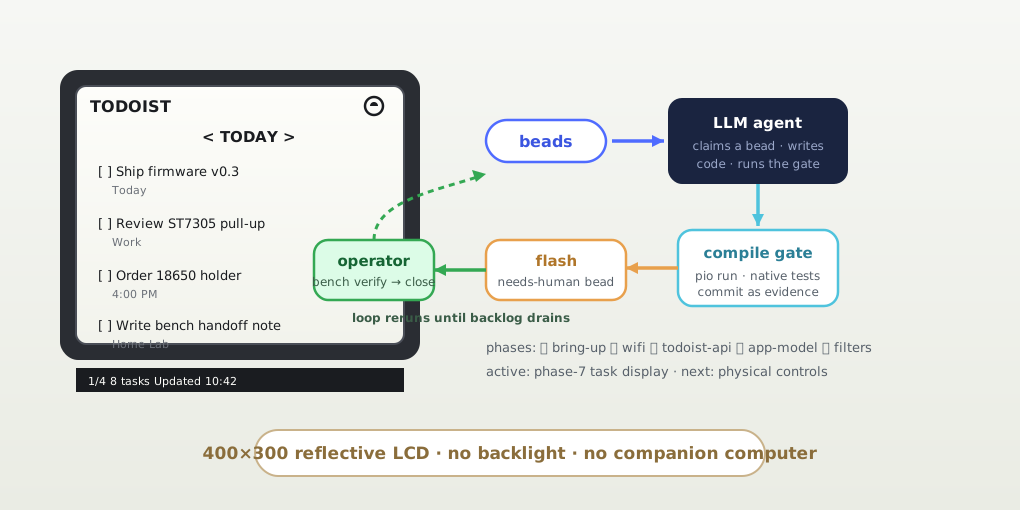
The idea: a dedicated Todoist dashboard on a Waveshare ESP32-S3-RLCD-4.2 — an always-available task display that sits on the desk, connects directly to Todoist over Wi-Fi, and shows tasks, saved views, and filter results on a 4.2-inch reflective LCD with physical buttons for navigation. No phone, no browser tab, no companion computer. A standalone appliance.
The hardware
The Waveshare board is a genuinely interesting choice: ESP32-S3 with 16 MB flash and 8 MB PSRAM, and the display is an ST7305 reflective LCD — monochrome, 400×300, no backlight. It’s readable by ambient light like paper, refreshes far faster than e-paper, and sips power. The panel renders through the U8g2 graphics library with a Waveshare ST7305 wrapper, using a full framebuffer of roughly 15 KB, and I had to write a custom PlatformIO board definition because the generic ESP32-S3 DevKit config doesn’t accurately describe the Waveshare N16R8 module.
The text-oriented UI is deliberately spare: header with Wi-Fi state, a filter selector (< TODAY >), task rows at 6×13 pixels with due details beneath, and a footer with page, count, and last refresh. Four buttons do all the work — filter next/previous, page next, manual refresh — with debouncing and long-press semantics planned.
Building by stewardship
Here’s what makes this experiment unusual: the repo contains a complete agent development harness built around my vision instead of my typing.
docs/SPEC.md— a seeded backlog of beads (issue tracker: bd/beads) broken into phases: hardware bring-up, Wi-Fi, Todoist API, application model, filters, controls, display.harness/ralph.sh— a loop that claims the next ready bead, hands it to an LLM agent (viaopencode run --auto) with guardrails, and iterates. The agent implements, passes the compile gate (pio run), runs native unit tests, and commits its work as evidence.- Bench handoffs. Anything needing physical verification gets flashed by the agent and labeled
awaiting-operator— the loop stops, and I verify the behavior on the real device at the bench: confirm the bead (bd close) or send feedback (bd update --notes) and rerun. The loop never pushes, never amends, never reads the device serial — flash-only device access, observation is operator-only. - Secrets discipline.
firmware/include/secrets.his gitignored and never committed; the build fails with a clear#errorif the token isn’t configured, and the agent’s guardrails forbid printing or committing it.
One hundred and twenty-three commits in, the phases through Wi-Fi, the Todoist API (including the Sync-API investigation for retrieving saved filters), the application model, and the filter selector are done — each phase checkpointed through the loop with my bench confirmations between agent runs.
What it taught me
Stewardship is a real engineering skill, and it looks like systems design: the valuable work isn’t typing the JSON parser — it’s designing the bead backlog, the compile gate, the handoff contract, and the boundaries that let an agent move fast without breaking the secrets discipline or the architecture. The onion architecture dependency rule (“domain must not depend on Arduino, Wi-Fi, HTTPS, or U8g2”) is enforced by test-first native tests that run without hardware, so the LLM can verify its own work before it ever touches the bench.
Hardware also closes the loop that LLM coding usually leaves open: the device is the integration test. A compile pass means nothing until the ST7305 initializes and the loop stays responsive at 60 Hz — which is why the bench handoff is the atomic unit of progress, not the commit.
It’s mid-build, and the honest status is in the repo’s README checklist: phases 1–6 complete, phase 7 (task display polish) active, physical controls verified. When it’s done, it’ll be the thing on my desk that tells me what today looks like — built by a partnership between my vision and a very patient agent.