When There Is No API, the Browser Is the API: Auditing 30,000 Google Photos with AutoHotkey
One of my first smart devices was a Nexus, and my long relationship with Google phones eventually landed me on a Pixel 3 — which, at the time of purchase, came with an agreement from Google: unlimited cloud photo storage for any photos backed up through the device. Over the years I accumulated a lot of pictures through that promise.
What I failed to notice was the loophole I was living inside from the other direction. Photos uploaded through the web UI — and later, photos synced from my Pixel 7 and my current Pixel 10 — were not covered by the unlimited backup. They counted against the 15 GB cap that Google Photos shares with Gmail and Drive. Years of uploads, quietly billed to a pool I thought I wasn’t touching.
Rerouting the pipeline
The engineering fix for ongoing backups came first: tools like Syncthing let me synchronize photos between my devices so everything lands on the Pixel 3, which stays responsible for uploading to Google’s cloud — keeping every new photo on the unlimited path.
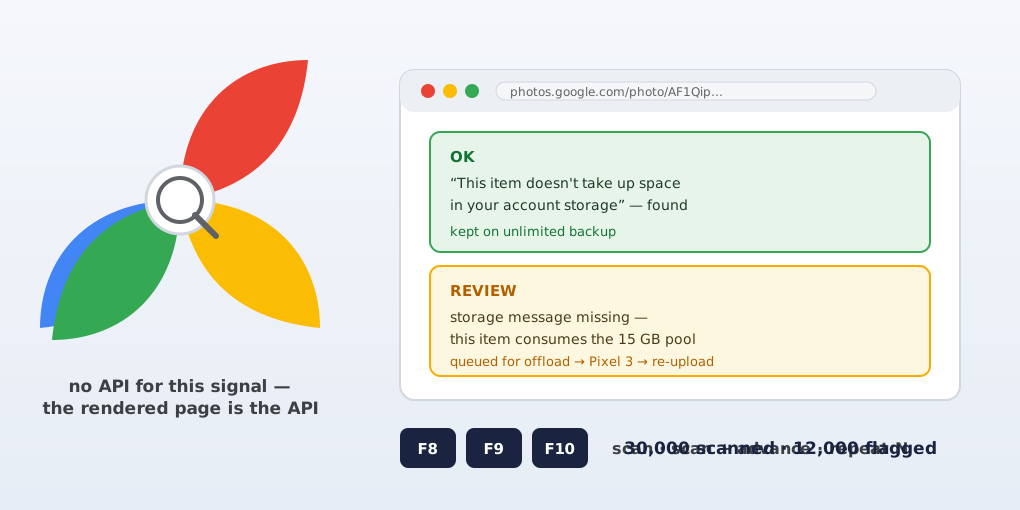
That still left the back catalog: the images already sitting in the cloud and contributing to usage. Here’s the thing about Google — they don’t make this data available via an API. There is no endpoint that says “this photo counts against your quota.” The only place the signal exists is the rendered web UI, where each photo’s info clearly states whether it takes up space in your account storage.
The tool: AutoHotkey, an old friend
I had limited experience with AutoHotkey early in my engineering career, using it as an automation script for very simple and tedious tasks — and this was the same shape of problem, scaled up: repetitive, browser-bound, and judgment-free. A perfect use case.
The result is Google Photos Audit, a two-layer tool:
GooglePhotosAudit.ahk— an AutoHotkey v2 launcher with three hotkeys:F8scans the current photo,F9scans then advances,F10asks for a count and repeats scan-plus-advance N times (Esc or a second F10 stops it).GooglePhotosAudit.ps1— a PowerShell helper that does the actual inspection.
Why not plain curl? Two reasons, both from Google being who they are: curl can’t reuse the authenticated session from an open Chrome tab, and Photos renders its content with JavaScript, so the raw HTML isn’t the page. Instead, the helper connects to Chrome’s local DevTools endpoint (--remote-debugging-port=9222, in a dedicated profile), finds the signed-in Google Photos tab, and evaluates JavaScript against the live DOM — looking for one exact string:
This item doesn't take up space in your account storage
Absent, the photo’s URL is appended to GooglePhotos-review.txt with a timestamp and a REVIEW marker.
The advance step is where the craft lives. Google Photos ignores HTMLElement.click() while its controls are hidden, so the script finds a visible “View next photo” button, hovers it with a native mouse move, then sends a native press/release through DevTools. Each inspected photo gets a random 100–1000 ms dwell, and every advance is verified by checking whether the photo URL actually changed — if not, the script reopens Photos home, restores the last checked URL, and retries once before pausing with the reason logged. It ran for hours through roughly 30,000 photos, flagging nearly 12,000 that were contributing to my storage.
What it taught me
When there’s no API, the browser is the API — and Chrome DevTools Protocol is a legitimate automation surface, not just a debugging tool. The README is honest about the trade: the DevTools endpoint listens on localhost, and any local process could connect while that Chrome window is open, so you close it when you’re done.
The flagged 12,000 now exist as a work queue in the repo — my archive of storage-consuming images, ready to be offloaded from Google and sideboarded back through the Pixel 3, where the unlimited backup still holds. One old tool, one borrowed API, and my grandfathered storage promise is finally operating at full value.