Slides as Code: Building a Team Workshop with Reveal.js and an LLM
My team is increasingly invested in LLM technologies, so I wanted to host a workshop on the critical factors of not letting the LLMs do the deciding — how to make good judgments in the age of LLM-powered engineering. I had two ways to build the deck: open PowerPoint or Keynote, or treat the presentation as software. I chose the second, and the build experience turned out to be the more interesting experiment: an LLM authored the entire presentation, and the result is a diffable, reviewable, self-contained website instead of a binary file.
The deck is live on GitHub Pages with the source on GitHub.
Why not the traditional tools
PowerPoint and Keynote are excellent GUI editors, but as a medium for technical content they carry baggage that matters once the deck is part of a team’s workflow:
- Binary blobs can’t be meaningfully diffed or reviewed — a “what changed since last time?” question has no good answer.
- Design-by-tweaking — every margin nudge is a manual act, and consistency across slides is a discipline rather than a system.
- They don’t deploy. A deck becomes an email attachment, exported to PDF, or a shared drive file — never a URL a teammate can open and navigate themselves.
For a workshop about not letting the LLM decide and keeping changes reviewable, authoring in a reviewable medium wasn’t just convenience — it was on-message.
The Reveal.js experience
I built the deck on Reveal.js 6, and the craft is in making it self-contained: the entire Reveal distribution is vendored into the repo under vendor/, so the deck runs from any static file server (python -m http.server 8000 is the whole install step) with no Node build, no CDN dependency, and no version drift.
A small assets/deck.js does the orchestration, and its config records the presentation design decisions:
const deck = new Reveal({
  hash: true,               // every slide is deep-linkable
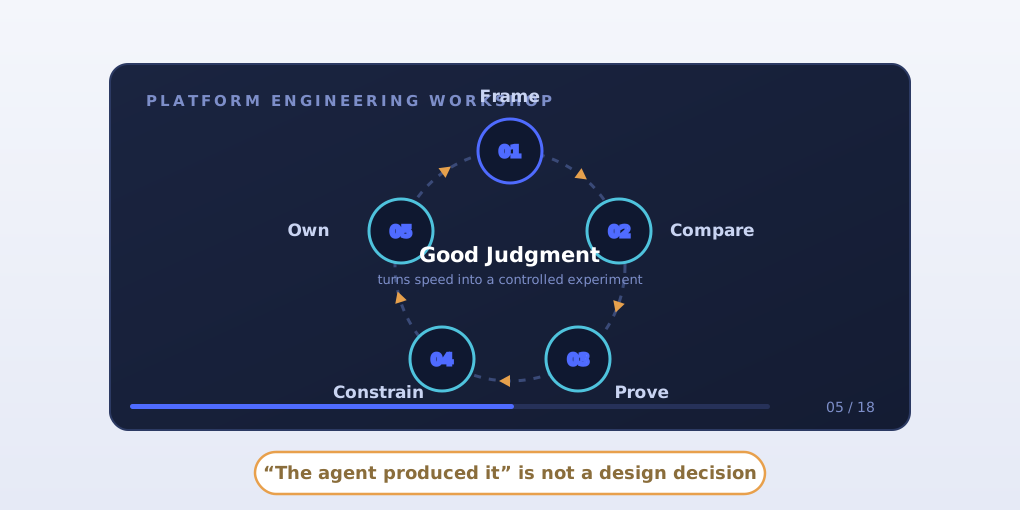
  slideNumber: 'c/t',       // "5 / 18" in the corner
  transition: 'fade',
  navigationMode: 'linear',
  width: 1440, height: 810, // fixed design surface, scales to any screen
  margin: 0.03,
});
The fixed 1440×810 surface with a 0.03 margin is the quiet superpower here: I design slides once at presentation resolution and Reveal scales the whole canvas to whatever projector, laptop, or phone is in the room — no responsive re-authoring, ever. hash: true turns each slide into a URL I can paste into a follow-up message.
Beyond stock Reveal, the deck adds a custom speaker-notes panel — every slide carries an aside.notes with facilitation cues and timing (“2 minutes. Make clear that this is not an anti-AI message”), toggled with the N key, plus an aria-live slide counter. Slides themselves are semantic HTML sections with a handful of custom classes (kicker, era cards, bottom-line, split compare) styled by one bespoke stylesheet — a design system of about ten primitives instead of eighty hand-tweaked text boxes.
What it’s like to author with an LLM
I handed the LLM the source article I wanted the workshop to open from — “AI is removing the middle class of software engineering” — plus the audience (platform SREs responsible for Azure, AKS, Argo CD, and GitOps), the duration, and the arc I wanted: shift in constraint → repeatable loop → anti-patterns → live scenario → checklist.
What the LLM did well exceeded my expectations:
- Structure and arc. Eighteen slides with a real narrative shape, a 12-minute group exercise in the middle, and a closing commitment slide.
- Speaker notes as a first-class artifact. Every slide came with facilitation notes — timings, phrasing, audience prompts — that I’d normally write as an afterthought in the notes pane at 11pm.
- A consistent visual system. One coherent stylesheet, dark cover, disciplined type scale — better instinct than most humans bring to their tenth slide.
- Concrete scenario writing. The exercise PR — “make payments deploy faster across all production clusters,” smuggling a shared ApplicationSet, auto-sync with prune, a cluster-wide role, and a disabled network policy — is exactly the flavor of change my team reviews.
What needed steering:
- Fact discipline. Left alone, generative tools reach for invented statistics and generic imagery. The README now states the deck “does not rely on external imagery or unsupported metrics” — that constraint came from pushing back on drafts until every number was either real or absent.
- Audience truth. The scenario needed my organization’s shape (tenant boundaries, promotion paths), so I supplied context instead of accepting plausible defaults.
- The revision loop is conversational, not surgical. “Make the debrief slide less prescriptive” works; “move this box 20 pixels left” is the wrong vocabulary. You steer like an editor, not like a designer.
The result: the deck went from article to presentable in an evening, and it can be fixed in a minute — editing a slide is a text edit in a commit, reviewable like any PR, with the git history as version control that PowerPoint never had.
What it taught me
The workshop itself now exists as a repeatable artifact: a five-step judgment loop (Frame → Compare → Prove → Constrain → Own), the two sentences that carry the thesis — “The agent produced it” is not a design decision and “the model recommended it” is a hypothesis, not evidence — and a six-question review checklist (Problem, Boundary, Evidence, Smallest move, Signals, Recovery). The full session is online for anyone to run.
But the durable lesson is about the medium. For technical presentations, slides-as-code with an LLM author isn’t just faster than the traditional tools — it’s a different category: versioned, reviewable, deep-linkable, deployable, and improvable by the same practices we use on everything else we ship. There’s a pleasant irony that a workshop about good judgment with AI was itself produced under those rules — and the irony was the point.